

How to Configure One-Click Upsell for Stripe
Using WooCommerce Buy Now, you can easily configure & setup one click upsells for Stripe. Read this doc to understand & setup the same on your store.
Using WooCommerce Buy Now, you can now easily configure and setup one click upsell for Stripe. Download and activate the WooCommerce Stripe free plugin and refer the steps mentioned below.
Go to WooCommerce > Settings > Checkout > Stripe. Fill other details as shown in following screenshot & make sure you’ve enabled Saved cards.
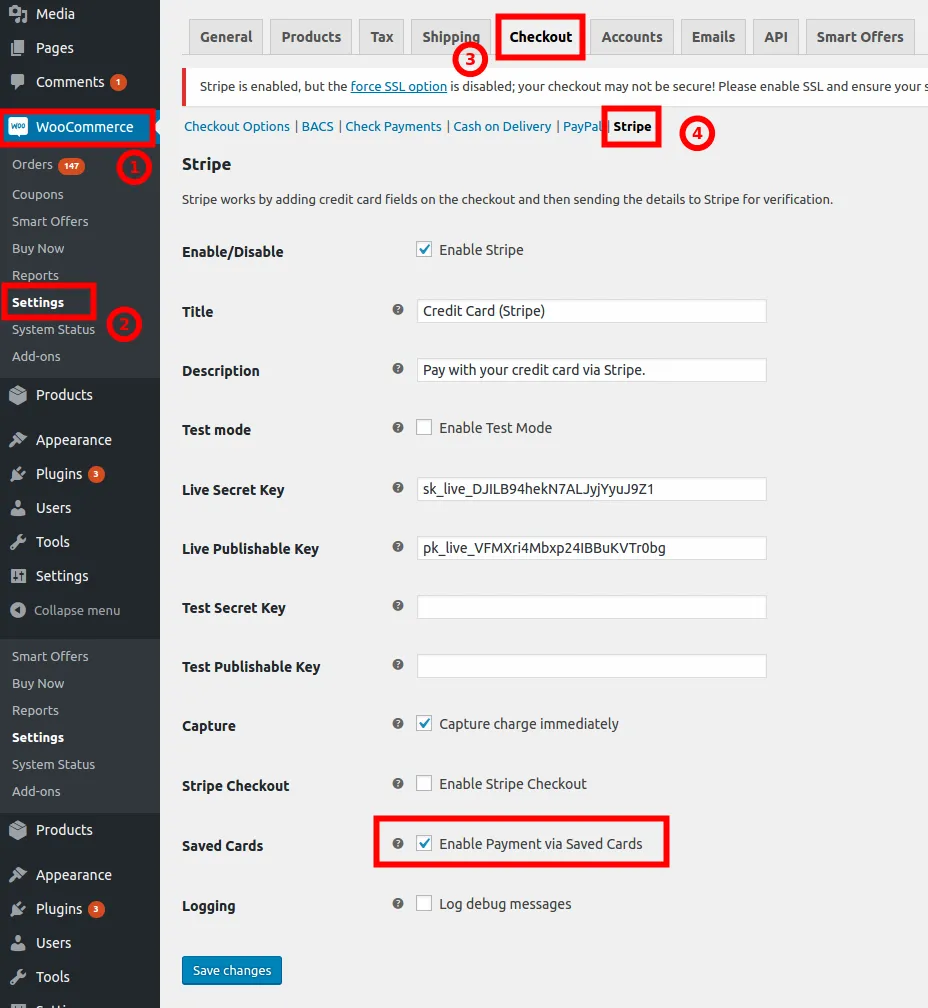
Note: For one-click upsell for Stripe to work correctly, customer should have at least one order paid from their account via Stripe (with Saved Cards enabled). Read more about it in Buy Now 1-click Requirements.