

Creating a new Smart Offer - Step 4 of 7 - Show Offer on Page
Step 4 of creating a new Smart Offer - 'Show Offer on Page'. This allow you to select pages - cart, checkout, My Account, etc. where you want to show the offer.
Select the pages where your offer should be visible.
This section lets you choose a page (or pages) on which you want to show your offers.
Tick one or multiple choices depending on where you want the offer to be shown (Note: One offer will be visible only once in a session).
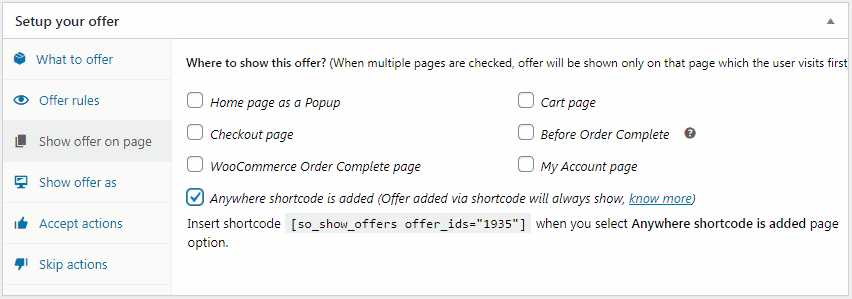
- Home page as a Popup - Offer visible default as a popup.
- Before Order Complete - Offer visible only after clicking the Place Order (or Proceed to payment gateway) button.
- Cart page, Checkout page, WooCommerce Order Complete page, My Account page – offer visible as you select the options.
- Anywhere shortcode is added - If you want to show the offer on pages other than the listed ones, then select this option and add shortcode
[so_show_offers offer_ids="xxx"]on the post/page where you want to show this offer.
Next : Creating a new Smart Offer – Step 5 of 7 – Show Offer As