


AffiliateWP is a WordPress affiliate marketing plugin that lets you create and manage your own affiliate program from your WordPress dashboard. It tracks affiliate referrals, commissions, coupons, and payouts without charging platform fees on referral sales.
In this AffiliateWP review, we look at its tracking, commission management, integrations, affiliate dashboard, payouts, pricing, and add-on structure to help you decide whether it makes sense for your WordPress or WooCommerce store.
AffiliateWP is especially useful if you want one affiliate program that can work across different WordPress platforms. If you run a WooCommerce-only store, though, its broader feature set may not be necessary, so the main question is whether you need that flexibility enough to justify the cost and setup.
AffiliateWP review: is it worth it in 2026?
AffiliateWP is worth considering if your affiliate program needs to work across more than just WooCommerce. It supports WooCommerce alongside other WordPress integrations and gives you control over referrals, commissions, affiliates, and payouts from your own WordPress dashboard.
For a WooCommerce-only store, the decision is more straightforward: compare the features you actually need with the plan that includes them. If you only need basic affiliate tracking and commissions, you may not need AffiliateWP’s more advanced affiliate management features.
| AffiliateWP feature | What you get |
|---|---|
| Affiliate tracking | Track affiliate referrals and visits using referral links and configurable cookie settings. |
| Supported platforms | WooCommerce plus integrations with other WordPress eCommerce, membership, learning, and form platforms. |
| Commission management | Set percentage or flat-rate commissions and create different rates for affiliates, products, categories, and groups. |
| Coupon tracking | Credit affiliates when customers use their assigned affiliate coupons. |
| Advanced affiliate features | Pro features include recurring referrals, tiered affiliate rates, lifetime commissions, fraud prevention, and direct-link tracking. |
| Affiliate payouts | Pay affiliates through supported payout methods or generate payout files for external processing. |
| Affiliate dashboard | Give affiliates a dedicated area to view referrals, earnings, links, visits, and promotional creatives. |
| Pricing | Three paid plans with different site limits and feature availability. |
If you need an affiliate plugin that works across WooCommerce, Easy Digital Downloads, membership platforms, learning platforms, and other WordPress integrations, AffiliateWP gives you that flexibility. If your business is entirely WooCommerce-based, compare its plan requirements with a WooCommerce-native alternative before you commit.
What is AffiliateWP and how does it work?
AffiliateWP is a WordPress plugin for running an in-house affiliate program. Instead of joining an external affiliate network, you install the plugin on your own WordPress site and manage affiliates, referrals, commissions, and payouts from your dashboard.
The basic process is simple. An affiliate receives a unique referral URL and shares it with their audience. When someone visits your site through that link, AffiliateWP records the referral information in the visitor’s browser. If the visitor later completes a supported purchase or conversion, AffiliateWP can connect that conversion to the referring affiliate and create a referral commission.
The cookie expiration period is configurable, so you can decide how long a referral remains attributable to an affiliate. AffiliateWP also supports direct-link tracking on eligible plans, which lets approved affiliates promote your site without displaying a traditional referral parameter in the URL.
This approach gives you more control over your affiliate data and program rules because the affiliate system runs inside your WordPress installation rather than on a separate affiliate network.
AffiliateWP features: what does it offer?
The important thing with AffiliateWP is not simply how many features it has. The better question is whether those features solve the day-to-day problems involved in running an affiliate program.
Affiliate dashboard and creative assets
AffiliateWP automatically creates an Affiliate Area where affiliates can log in, generate referral links, view performance, check referrals, and access promotional materials.
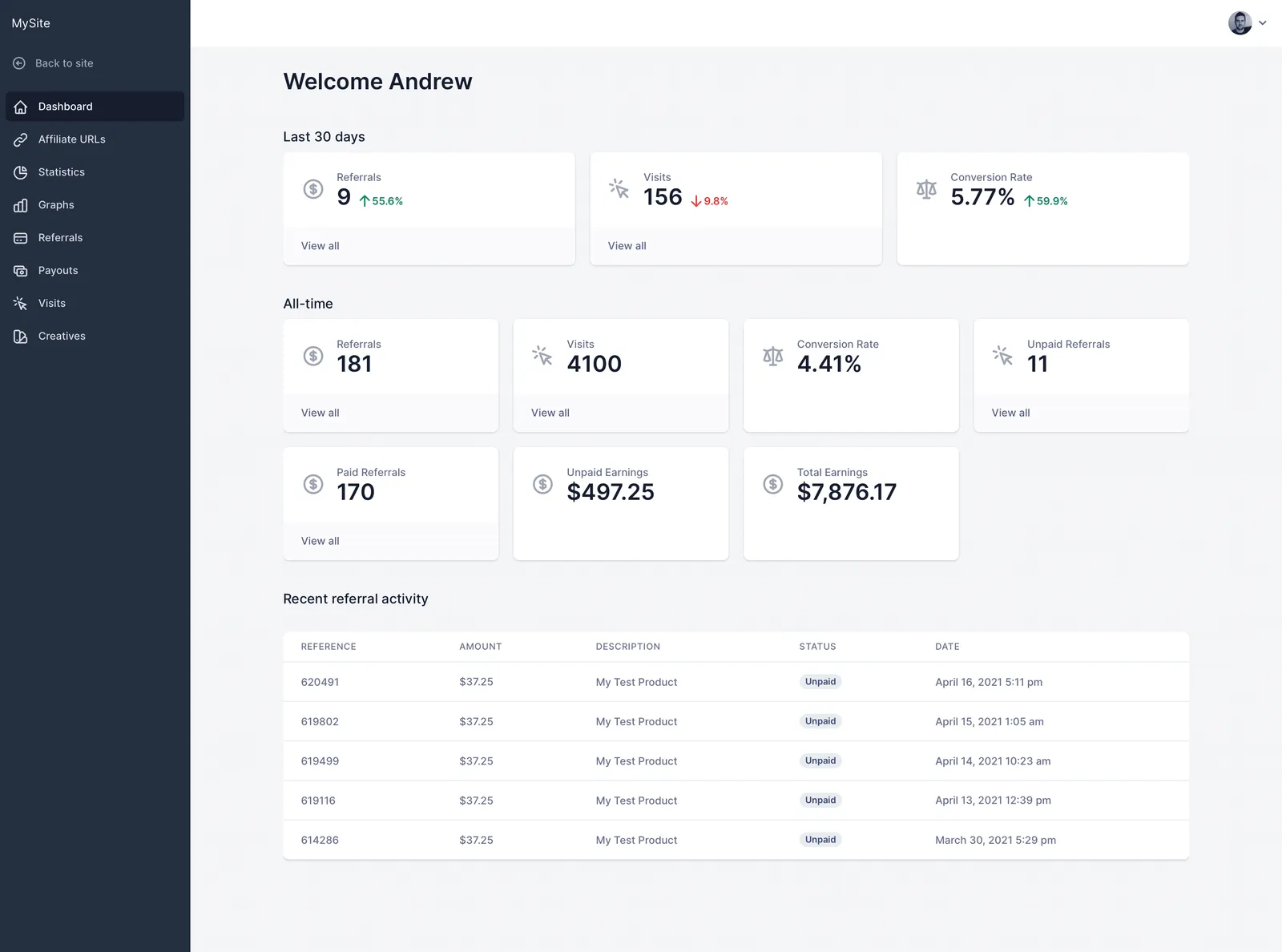
You can also provide affiliates with banners, text links, and other creatives from the same area. This is useful when you work with multiple partners and want everyone to use approved promotional material instead of creating their own.
For affiliate managers, the benefit is less back-and-forth. Affiliates can access the information and assets they need without asking you for individual links or performance updates.
Referral tracking and attribution
AffiliateWP tracks referrals using affiliate links and browser cookies. The cookie duration can be configured according to your attribution window, and the plugin can continue to associate the visitor with the referring affiliate while the tracking information remains valid.
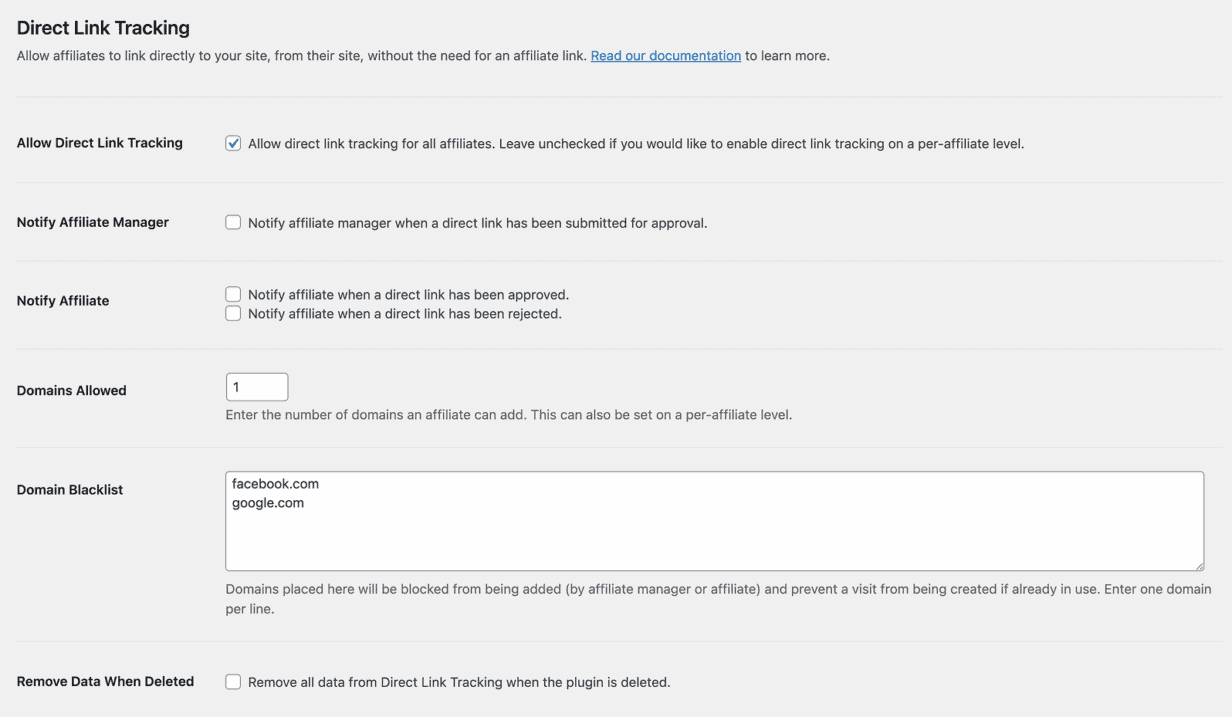
It also supports direct-link tracking as an advanced option. This can be useful for established affiliates who want to link directly to your site instead of sharing URLs containing a visible referral parameter.
One important distinction is that AffiliateWP tracks unique visits rather than treating every page view or click as a separate visit. This matters when you’re reviewing affiliate reports because visit numbers should not be interpreted as a simple count of every link click.
Fraud prevention
Affiliate programs need more than referral tracking. You also need controls that prevent affiliates from earning commissions in situations you do not intend to reward.
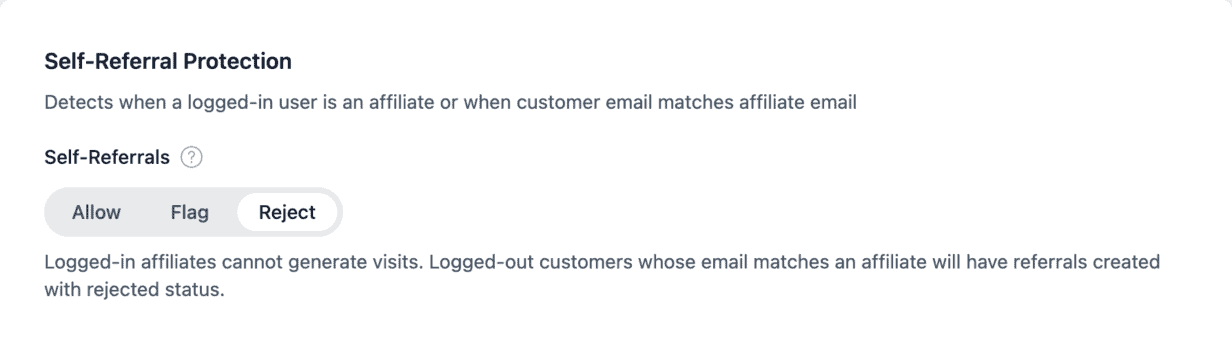
- Self-referral controls can prevent affiliates from earning commissions on their own purchases.
- Fraud prevention tools help you identify and restrict suspicious affiliate activity.
- Referral and cookie settings give you control over how affiliate attribution works.
These controls become more important as your affiliate program grows because manually reviewing every referral is not practical once you have a large number of affiliates and orders.
Flexible commission rules
AffiliateWP lets you set a default commission rate and create more specific rates for affiliates, products, categories, and groups. You can use either percentage-based or flat-rate commissions depending on how you want to reward referrals.

This is useful when different products have different profit margins. For example, you might offer a higher commission on a high-margin digital product while using a lower rate for products with tighter margins.
Affiliate coupon tracking is another useful option for influencer and creator campaigns. An affiliate can promote a coupon code on social media, email, or another channel, and the sale can still be attributed to that affiliate even when the customer does not use an affiliate link.
Payouts and commission management
AffiliateWP supports several payout methods, including Stripe, PayPal, store credit, and manual payouts. Its payout tools let you review what has been paid and what is still awaiting payment.
Automatic payouts are available with the Pro plan, while other payout workflows can be handled manually. You can also generate payout files when you prefer to process payments outside the plugin.
This gives you a choice between automating affiliate payments and keeping tighter manual control over when commissions are released.
AffiliateWP add-ons: how does the modular system work?
AffiliateWP uses a modular approach. The core plugin handles the basic affiliate program, while additional functionality is provided through plan-specific features and add-ons.
Some advanced capabilities are available with the Pro plan. These include features such as recurring referrals, lifetime commissions, tiered affiliate rates, direct-link tracking, fraud prevention, and automatic payouts.
This structure gives you flexibility, but it also means you should check the plan comparison before buying. A feature you consider essential may not be available on the lower-priced Personal plan.
For example, recurring referrals are particularly important if you sell subscriptions. AffiliateWP’s Recurring Referrals functionality can create commissions for subsequent subscription payments, but it requires the Professional/Pro license.
- Recurring referrals: Reward affiliates for qualifying subscription renewals.
- Tiered affiliate rates: Give different commission rates based on affiliate performance or structure.
- Lifetime commissions: Continue attributing eligible future purchases to an affiliate.
- Direct-link tracking: Let approved affiliates promote your site without relying on a visible referral parameter.
The modular structure itself is not necessarily a problem. The important thing is to identify the features your program actually needs before choosing a plan.
AffiliateWP pricing and plans: what does it really cost?
AffiliateWP currently has three main plans: Personal, Plus, and Pro. The introductory prices are discounted for the first year, while each plan has a higher standard renewal price.
| Plan | Introductory price | Renewal price | Sites | What stands out |
|---|---|---|---|---|
| Personal | $149.50 / year | $299 / year | 1 | Core affiliate tracking, coupons, reporting, WooCommerce and other integrations |
| Plus | $179.55 / year | $399 / year | 2 | Additional affiliate growth tools and multi-currency commissions |
| Pro | $209.65 / year | $599 / year | 5 | Recurring referrals, tiered rates, lifetime commissions, direct-link tracking, fraud prevention, automatic payouts, and other advanced features |
The renewal price is the number worth paying attention to if you plan to keep the plugin long term. The first-year promotional price can make the initial purchase look considerably cheaper than the ongoing subscription.
Plan selection also matters more than the headline price. If you need recurring commissions, lifetime commissions, tiered rates, or automatic payouts, the Pro plan may be the relevant comparison rather than simply choosing the cheapest license.
For a small WooCommerce store running a straightforward affiliate program, the Personal plan may cover the basics. A larger or more advanced program should compare the features it needs against the higher-tier plans before calculating its actual yearly cost.
AffiliateWP pros and cons
AffiliateWP’s main strengths are its WordPress-native setup, broad integration support, flexible commission rules, and affiliate management tools. The main trade-offs are its paid-only model, renewal pricing, and the fact that some advanced capabilities sit behind the Pro plan or additional extensions.
Where AffiliateWP works well
- Broad WordPress compatibility: Useful if your business operates across WooCommerce and other WordPress platforms rather than relying on WooCommerce alone.
- Flexible commission rules: You can create different rates for affiliates, products, categories, and groups instead of applying one commission rate to everything.
- Affiliate self-service: Affiliates can generate links, view referrals, monitor performance, and access creatives through their own dashboard.
- Multiple payout options: You can use supported payment services, store credit, or manual payout workflows depending on how you want to manage commissions.
- Data stays in WordPress: Your affiliate program runs on your own WordPress site rather than requiring you to manage it through an external affiliate network.
Things to consider
- Renewal pricing: The introductory price is substantially lower than the standard renewal price, so calculate the long-term cost before purchasing.
- Advanced features require Pro: Features such as recurring referrals, lifetime commissions, tiered rates, direct-link tracking, and automatic payouts are part of the higher-tier offering.
- No free version: AffiliateWP is a premium plugin, so there is no free WordPress.org version to use for a long-term trial.
- Broader than WooCommerce: If you only operate a WooCommerce store, some of AffiliateWP’s cross-platform capabilities may not be relevant to your workflow.
Who should use AffiliateWP?
AffiliateWP makes the most sense for businesses that want to manage their own affiliate program inside WordPress and may need integrations beyond WooCommerce.
It can be a good fit for:
- Multi-platform WordPress businesses: Companies using WooCommerce alongside membership, learning, digital product, or other WordPress platforms.
- Subscription businesses: Stores that need recurring affiliate commissions and are prepared to use the Pro plan for that functionality.
- Growing affiliate programs: Businesses that need flexible commission rules, affiliate dashboards, promotional creatives, and structured payout management.
- Agencies and developers: Teams that want a WordPress-based affiliate system they can extend and integrate with a broader WordPress stack.
If you only sell through WooCommerce and want your affiliate management to sit closely alongside your existing WooCommerce workflow, it is worth comparing AffiliateWP with a WooCommerce-native option before making a decision.
What should you do next?
Before buying AffiliateWP, write down the commission, tracking, payout, and integration features your affiliate program actually needs. Then check which plan includes those features and calculate the renewal cost rather than comparing only the introductory price.
If you run a WooCommerce-only store, also compare the workflow rather than just the feature list. A WooCommerce-native affiliate plugin can make sense if you want affiliate management closely connected to your existing products, orders, commissions, and customers.
For more options, see our best WordPress affiliate plugins and WooCommerce affiliate plugins comparisons.
Affiliate for WooCommerce: a WooCommerce-native alternative
If your store runs entirely on WooCommerce, Affiliate for WooCommerce from StoreApps takes a more WooCommerce-focused approach. It lets you manage affiliates, referrals, commissions, campaigns, coupons, and payouts from within WooCommerce rather than building your workflow around a broader WordPress affiliate ecosystem.
It supports commission rules based on products, categories, affiliates, subscriptions, first or repeat purchases, coupons, affiliate groups, and other conditions. It also includes multi-tier and lifetime commissions, affiliate dashboards, campaign assets, and PayPal or Stripe payouts.
Affiliate for WooCommerce currently lists 6,000+ paying stores on the StoreApps website.
If you are moving from AffiliateWP, StoreApps also provides a one-click migration option for importing AffiliateWP affiliates and their links.
Consider Affiliate for WooCommerce if:
- You run a WooCommerce-only store.
- You want affiliate management inside the WooCommerce workflow.
- You need flexible commission rules without building the program around multiple extensions.
Compare Affiliate for WooCommerce with AffiliateWP
FAQs
What happens to an affiliate commission when a WooCommerce order is refunded?
AffiliateWP can automatically reject an unpaid referral when its associated WooCommerce order is refunded, cancelled, or otherwise reaches a qualifying failed or deleted status. Paid referrals cannot be automatically recalled, so stores should consider their refund window when deciding when to pay affiliates.
Can I require approval before affiliates join my program?
Yes. AffiliateWP can require manual approval for new affiliate applications. This is useful if you want to review an affiliate’s website, audience, promotional methods, or other details before allowing them to promote your products.
Can existing WooCommerce customers become affiliates?
Yes. AffiliateWP includes an affiliate signup widget that can encourage existing WooCommerce customers to register as affiliates. This can be useful for turning satisfied customers into referral partners without recruiting every affiliate from scratch.
Can affiliates create their own referral links?
Yes. The Affiliate Area allows affiliates to generate custom referral URLs for the pages they want to promote. This is useful when different affiliates want to send visitors to different products, landing pages, or content rather than a single homepage.
Does AffiliateWP track clicks or visits?
AffiliateWP records unique visits rather than treating every page view or individual click as a separate visit. The distinction matters when interpreting affiliate reports, especially when comparing traffic numbers with analytics platforms that use different definitions of a click or visit.
Additional resources
- Ultimate Affiliate Pro review - Another WordPress affiliate plugin to consider.
- How to set up an affiliate area - Useful if you are building the front-end experience for your affiliates.
- WooCommerce affiliate plugins - Compare affiliate tools specifically for WooCommerce stores.
Ken Weatherford
I barely read anything slight whether there is multi tiered payout for WooCommerce Affiliate but you should explain more, like how many levels, $ and % payout for each tier, etc.
Does WooCommerce Affiliate have levels of affiliates or not? Can a person sign up, get 50% commission, and promote to another person, and receive commissions on their sales? If so, how many levels?
I have 11 sites. Does WooCommerce have its own affiliate program? If not, why not?
Thanks!
Akshat Kothari
Thank you for the feedback Ken.
Please refer to this article to know how multi-tier works in the Affiliate for WooCommerce plugin.
Coming to your question of 'Does WooCommerce have its own affiliate program?', can you specify what exactly are you referring to?
Jay
I was comparing the two - thanks for the review. I'm new to affiliate marketing and this has been helpful. Is it possible to create a royalty program with these plugins e.g. John gets 10% of the product price every time that product is sold to a customer.
Akshat Kothari
Hi Jay, With Affiliate for WooCommerce plugin, you can achieve what you want. It allows you to create a commission plan (not a royalty program) wherein you can allow only John to earn a 10% commission on sale of a particular product. Refer this article for more details.